Reducing container cold start times using SOCI index on DLAMI and DLC | Amazon Web Services
Deep Learning AMI and AWS Deep Learning Containers are now enabled with support for SOCI snapshotter and index. Seekable OCI (SOCI) is a technology that enables efficient container image management through selective file downloading. It uses a layer-based indexing system to map file locations within container images, allowing containers to start with only the necessary files loaded (lazy loading). This approach reduces network bandwidth usage and improves container startup times, making it particularly valuable for organizations managing large container images in cloud environments.
In this post, we look at how to use SOCI on publicly available Deep Learning AMIs and Containers, when to use the various SOCI modes provided by the tool, and how to quickly and efficiently use this tool in your workloads today.
Background
As organizations deploy artificial intelligence (AI) and machine learning (ML) workloads at scale, container startup time has become a bottleneck in production environments. Whether it’s spinning up training jobs, serving inference endpoints, or scaling GPU clusters automatically, the time spent downloading multi-gigabyte container images directly impacts cost, user experience, and operational efficiency. Traditional container deployment approaches force teams to download entire images before workloads can begin. This process can take multiple minutes to start up images commonly used in production. During development, a few minutes of wait time is barely noticeable. In production, those same minutes add up fast.
Organizations deploying deep learning infrastructure at scale typically encounter several critical challenges:
- Prolonged cold start times. Standard Docker image pulls of 15–20 GB can take 4–6 minutes per instance, delaying training jobs and inference endpoints during scaling events.
- Wasted compute resources. GPU instances sit idle during image pulls, burning through expensive compute hours while waiting for container initialization to finish.
- Scaling bottlenecks. When demand spikes trigger automatic scaling, slow container startup times prevent rapid response, leading to degraded performance or dropped requests.
- Bandwidth constraints. Large-scale deployments pulling massive images simultaneously can saturate network bandwidth, creating cascading delays across the infrastructure.
- Developer productivity. Data scientists and ML engineers waste valuable time waiting for containers to start during iterative development and experimentation cycles.
Container pulling mechanisms
When pulling a container for your workloads, AWS Deep Learning AMIs (DLAMI) and Deep Learning Containers offer three options: the standard Docker pull, SOCI parallel pull, and SOCI lazy loading through SOCI index. Think of these as a sliding scale of tradeoffs. Docker pulls are sequential and slow. SOCI parallel pull provides faster startup times by chunking downloads at the cost of compute resources. SOCI lazy loading provides near-instant container loading but requires files to be fetched on demand. You can use the following guide to choose the right mechanism for your workloads:
- The choice between lazy loading and parallel pull modes depends on the image, instance specifications, and storage configuration. Lazy loading requires images to have a SOCI index. Without one, the system falls back to standard pulling.
- Lower-spec instances should use lazy loading to conserve resources, while high-spec instances with multiple vCPUs and high network bandwidth benefit from parallel pull mode. Storage performance varies: EBS volumes are bounded by their provisioned IOPS and volume type, potentially creating bottlenecks during unpacking, while NVMe instance store delivers maximum I/O performance at the cost of data persistence across instance stop/start cycles.
The following example shows the various mechanisms based on the vLLM Deep Learning Container:
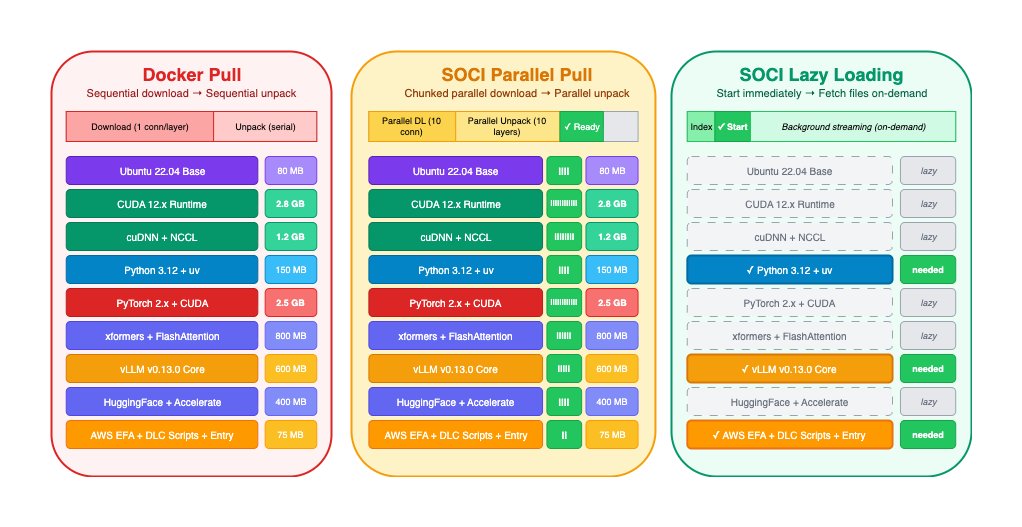
Deep Learning Container Pull Mechanisms
Solution architecture
The following diagram shows the architecture for using SOCI with DLAMI and Deep Learning Containers.
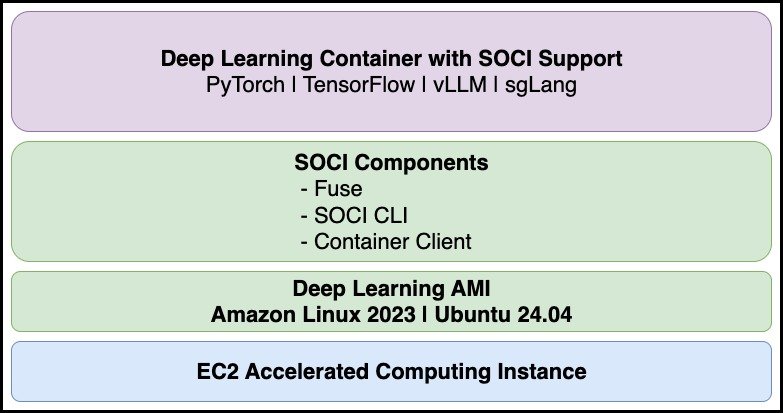
Container startup time comparison with SOCI snapshotter
The following benchmarks compare standard Docker pulls against SOCI snapshotter in both lazy loading and parallel pull modes.
Lazy loading mode
Lazy loading mode starts containers immediately by fetching only the necessary data on demand, with remaining layers loaded in the background as needed.
Prerequisites
SOCI index required
Important: Lazy loading mode requires the container image to have a SOCI index stored in the registry. Without a SOCI index, the snapshotter will fall back to standard pull behavior, and you won’t see any performance improvement. AWS Deep Learning Containers (DLCs) with the -soci tag suffix come with SOCI indexes pre-created and pushed to the registry, enabling lazy loading out of the box. For custom images, you must create and push SOCI indexes
Environment
- Instance Type: g5.2xlarge
- EBS: Size 500GiB, IOPS 3000, Throughput 125
- AMI: Deep Learning Base OSS Nvidia Driver GPU AMI (Ubuntu 24.04) 20260413 (
ami-06abbbf2049359343) - Docker Image:
public.ecr.aws/deep-learning-containers/vllm:0.19.0-gpu-py312-ec2-soci - Image Size: 9.72GB (compressed), 32.7GB (disk usage)
- Network: Corp
Start container with Docker (non-SOCI)
We use Docker to start the inference server directly. Since no image exists locally, Docker pulls and extracts the entire image before starting the container.
Total time: 6m59.099s.
#!/bin/bash
time docker run \
    --gpus all \
    -d \
    -v ~/.cache/huggingface:/root/.cache/huggingface \
    --env "HUGGING_FACE_HUB_TOKEN=$HUGGING_FACE_HUB_TOKEN" \
    -p 8000:8000 \
    --ipc=host \
    public.ecr.aws/deep-learning-containers/vllm:0.19.0-gpu-py312-ec2-soci \
    --model mistralai/Mistral-7B-v0.1
# output
Unable to find image 'public.ecr.aws/deep-learning-containers/vllm:0.19.0-gpu-py312-ec2-soci' locally
0.19.0-gpu-py312-ec2-soci: Pulling from deep-learning-containers/vllm
340d44d2921c: Pull complete
....2001a2421bf1: Pull complete
Digest: sha256:a6344c96a33ef98a32a27f89b41b8c0529d4fbbba248eb57f811725d415f68fc
Status: Downloaded newer image for public.ecr.aws/deep-learning-containers/vllm:0.19.0-gpu-py312-ec2-soci
e12d969eb71517d9a6a23b9b11cfa22ddda26a95f6a0f0d8df00cd5c4fdfe912

real    6m59.099s
user    0m0.391s
sys     0m0.452s
Start container with SOCI snapshotter (lazy loading)
We use nerdctl with SOCI snapshotter to start the inference container. Although no image exists locally, the SOCI-indexed image allows nerdctl to pull only the index and necessary layers to start the container, enabling lazy loading of remaining layers. Total time: 21.125s.
#!/bin/bash
time sudo nerdctl run \
     --snapshotter soci \
    --gpus all \
    -d \
    -v ~/.cache/huggingface:/root/.cache/huggingface \
    --env "HUGGING_FACE_HUB_TOKEN=$HUGGING_FACE_HUB_TOKEN" \
    -p 8000:8000 \
    --ipc=host \
    public.ecr.aws/deep-learning-containers/vllm:0.19.0-gpu-py312-ec2-soci \
    --model mistralai/Mistral-7B-v0.1
# output
public.ecr.aws/deep-learning-containers/vllm:0.19.0-gpu-py312-ec2-soci:           resolved       |++++++++++++++++++++++++++++++++++++++|
index-sha256:a6344c96a33ef98a32a27f89b41b8c0529d4fbbba248eb57f811725d415f68fc:    done           |++++++++++++++++++++++++++++++++++++++|
manifest-sha256:d91ad3b46204eace6de2fb27c46d9600337fa9c124b4c82fe0f335d391017daa: done           |++++++++++++++++++++++++++++++++++++++|
config-sha256:886ed36d57c44081a74a0ab052f57366d96ab2c0fe39bb3e2f8a46cc20db8ec2:   done           |++++++++++++++++++++++++++++++++++++++|
elapsed: 10.5s                                                                    total:  48.1 K (4.6 KiB/s)
189307b7899438415f3df4288b3fbb26bcc4cd43678e88ec3b062bc6330e3e3b

real    0m21.125s
user    0m0.004s
sys     0m0.011s
Lazy loading summary
Using SOCI snapshotter with lazy loading, the container started in 21.125 seconds, compared to 6 minutes 59.099 seconds with standard Docker. This improvement is achieved because SOCI pulls only the necessary layers to start the container, with remaining layers loaded on demand as needed.
Parallel pull mode
While lazy loading mode starts containers immediately by fetching only the required data on-demand, parallel pull mode downloads the entire image before startup but does so with higher concurrency than standard Docker pulls. This mode is ideal when you need the full image available at startup or when running I/O-intensive workloads.
Environment
- Instance Type: g5.4xlarge
- EBS: 500GiB gp3, 16000 IOPS, 1000 MB/s Throughput
- AMI: Deep Learning Base OSS Nvidia Driver GPU AMI (Ubuntu 24.04) 20260413 (
ami-06abbbf2049359343) - Docker Image:
763104351884.dkr.ecr.us-east-1.amazonaws.com/sglang:0.5.10-gpu-py312-cu129-ubuntu24.04-sagemaker - Image Size: 19.32GB (compressed), 60.4GB (Disk Usage)
- Network: Corp
Note: We use a private ECR image for this benchmark because public ECR is fronted by Amazon CloudFront, which limits network bandwidth and affects parallel mode performance. Private ECR is served directly from Amazon Simple Storage Service (Amazon S3), providing higher throughput.
Enabling parallel pull mode
The SOCI snapshotter on Deep Learning AMI defaults to lazy loading mode. To enable parallel pull mode, modify the configuration file at /etc/soci-snapshotter-grpc/config.toml:
# Parallel Pull Mode - significantly improves image pull times for large AI/ML images
# These are conservative defaults recommended by AWS for ECR
[pull_modes.parallel_pull_unpack]
enable = true # false(default): lazy loading/true: parallel mode
max_concurrent_downloads = -1 # unlimited global cap across all images
max_concurrent_downloads_per_image = 20 # per-image download connections
concurrent_download_chunk_size = "16mb"
max_concurrent_unpacks = -1 # unlimited global cap across all images
max_concurrent_unpacks_per_image = 10 # per-image parallel unpack threads
discard_unpacked_layers = true
Apply the configuration by restarting the service:
sudo systemctl restart soci-snapshotter.serviceTip: You can tune max_concurrent_downloads_per_image and max_concurrent_unpacks_per_image based on your instance type and network bandwidth. For detailed tuning guidance, see Introducing Seekable OCI Parallel Pull Mode for Amazon EKS.
Verifying parallel mode is active
Monitor the SOCI snapshotter logs during image pull to confirm parallel mode is enabled:
journalctl -u soci-snapshotter -fLook for log entries indicating parallel pull/unpack:
Apr 16 23:59:08 ip-172-31-86-91 soci-snapshotter-grpc[3108]:
  {"layerDigest":"sha256:e87500e698966458d9dfc34df84602985c9821f39666619792fe6282aa6df5d4",
   "level":"info",
   "msg":"preparing snapshot with parallel pull/unpack",
   "time":"2026-04-16T23:59:08.654819383Z"}
Pull image with Docker (non-SOCI)
Standard Docker pull downloads and extracts layers with limited concurrency.
Total time: 4m 44.163s
time docker pull \
  763104351884.dkr.ecr.us-east-1.amazonaws.com/sglang:0.5.10-gpu-py312-cu129-ubuntu24.04-sagemaker

Digest: sha256:fd0cf60bbb34a5d30f22595215a633e5d4a7260fc0868aabe3f04b1174b7365d
Status: Downloaded newer image for
  763104351884.dkr.ecr.us-east-1.amazonaws.com/sglang:0.5.10-gpu-py312-cu129-ubuntu24.04-sagemaker
763104351884.dkr.ecr.us-east-1.amazonaws.com/sglang:0.5.10-gpu-py312-cu129-ubuntu24.04-sagemaker

real    4m44.163s
user    0m0.339s
sys     0m0.423s
Pull image with SOCI parallel mode
Using nerdctl with SOCI parallel pull mode uses increased concurrency for both downloads and unpacking operations.
Total time: 2m 12.846s
time sudo nerdctl pull --snapshotter soci \
  763104351884.dkr.ecr.us-east-1.amazonaws.com/sglang:0.5.10-gpu-py312-cu129-ubuntu24.04-sagemaker

763104351884.dkr.ecr.us-east-1.amazonaws.com/sglang:0.5.10-gpu-py312-cu129-ubuntu24.04-sagemaker:
  resolved       |++++++++++++++++++++++++++++++++++++++|
manifest-sha256:fd0cf60bbb34a5d30f22595215a633e5d4a7260fc0868aabe3f04b1174b7365d:
  done           |++++++++++++++++++++++++++++++++++++++|
config-sha256:5e6a53b7478b0631dd3c4222ab6619dae3a3dd32a565921f10b0b03fdc316d46:
  done           |++++++++++++++++++++++++++++++++++++++|
elapsed: 132.8s    total:  89.3 K (688.0 B/s)

real    2m12.846s
user    0m0.018s
sys     0m0.075s
Parallel pull summary
Using SOCI parallel pull mode reduced image pull time from 4 minutes 44 seconds to 2 minutes 12 seconds, representing a 2.2x improvement in pull performance.
Conclusion
SOCI snapshotter provides improvements for both container startup and image pull operations:
- Lazy loading mode — Achieved a 20x improvement in container startup time (from 6+ minutes to ~21 seconds)
- Parallel pull mode — Achieved a 2.2x improvement in image pull time (from 4 minutes 44 seconds to 2 minutes 12 seconds)
Choose lazy loading mode when you need the fastest possible container startup, or parallel pull mode when you need the full image available before your workload begins.
Clean up
If you launched EC2 instances to test SOCI snapshotter, terminate them to avoid incurring ongoing charges. Delete any container images you pushed to Amazon Elastic Container Registry (Amazon ECR) during testing, and remove any SOCI indexes you no longer need.
Getting started with SOCI
DLAMI and Deep Learning Containers are publicly available today with SOCI snapshotter and SOCI index. For more information on publicly available DLAMI and Deep Learning Containers, you can check out SOCI Index DLAMI to select the images that support SOCI, and check out the Deep Learning Container repository to get more information on supported images with SOCI index.
For detailed configuration guidance and best practices, refer to the SOCI documentation and the Deep Learning Container SOCI documentation.