
VEHLA
NATIVE SWIFT
APPLE SILICON
0 CLOUD REQUIRED
ON-DEVICE
Your Mac has enough apps.
Launcher
Clipboard
OCR
AI
Dictation
Window Manager
Shelf
Notes
Snippets
Meet Vehla.
VEHLA - MASTER FILM
VIDEO SLOT
hero-master.mp4
1388×900 · 39s · H.264 + WEBM
Launch apps. Manipulate text. Search your clipboard. Dictate. Move windows. Hold files. Ask AI. Run workflows. Without leaving what you're doing.
FREE TIER · 7-DAY PRO TRIAL · PRO $29.99
SCROLL
01 / THE PROBLEM
You installed an app for that.
And another.
And another.
Vehla replaces the collection.
02 / QUICKGLASS
AI where the work already is.
Select something. Vehla appears beside it.
No copying.
No new window.
No broken flow.
SUMMARIZE REWRITE EXPLAIN REPLY ASK AI
03 / SHELF
Put it here.
Deal with it later.
Shelf is temporary working memory for your desktop. Drop something now. Use it somewhere else seconds or hours later.
PDF IMAGE FOLDER URL
04 / FLOW
Think it.
It's already typed.
ON-DEVICE·STREAMING·SYSTEM-WIDE·NO COPY / PASTE
Flow turns your voice into text directly inside the app you're already using.
05 / VEHLA IN MOTION
01 / 08
COMMAND
⌘ SPACE
Vehla appears from anywhere.
02 / 08
QUICKGLASS
ZERO SWITCHING
AI beside the thing you're working on.
03 / 08
SHELF
DROP ANYTHING
Files, text, images, folders and links.
04 / 08
FLOW
ON-DEVICE
Speak directly into the focused app.
05 / 08
SNAPWHEEL
ONE GESTURE
Actions and window control around the pointer.
06 / 08
CLIPBOARD
ALWAYS THERE
Find something you copied hours ago.
07 / 08
ISLAND
SYSTEM SURFACE
Vehla lives at the edge of macOS.
08 / 08
COMMAND CENTER
ONE APP
The collection disappears.
06 / SNAPWHEEL
ASK AI
SUMMARIZE
SCREENSHOT
SNAP LEFT
SNAP RIGHT
FULLSCREEN
CLIPBOARD
SHELF
Your cursor already knows where you are.
Put the controls around it.
07 / ISLAND
Some tools shouldn't need a window.
CONTROLS·STATUS·ACTIONS·SHORTCUTS·CONTEXT
08 / CLIPBOARD
You already copied it.
Vehla remembers where it went.
TEXTQuarterly summary paragraph
CODEdefer { try? handle.close() }
URLdeveloper.apple.com/documentation
IMAGEScreenshot 2026-08-10 at 21.23
EMAILhello@vehla.app
COMMANDdocker compose up -d
09 / LOCAL INTELLIGENCE
AI doesn't have to start in a browser.
RUNS ON YOUR MAC
LOCAL MODELS MLX OLLAMA LM STUDIO LEKH AI PRO
OR CONNECT YOUR OWN
OpenAI Anthropic Gemini DeepSeek OpenRouter
Run intelligence locally or connect the providers you already use. Vehla sits above the model layer so the workflow stays the same.
10 / WORKSPACES
Sometimes a command isn't enough.
Open a workspace.
Knowledge / Recall
Search everything Vehla has indexed locally.
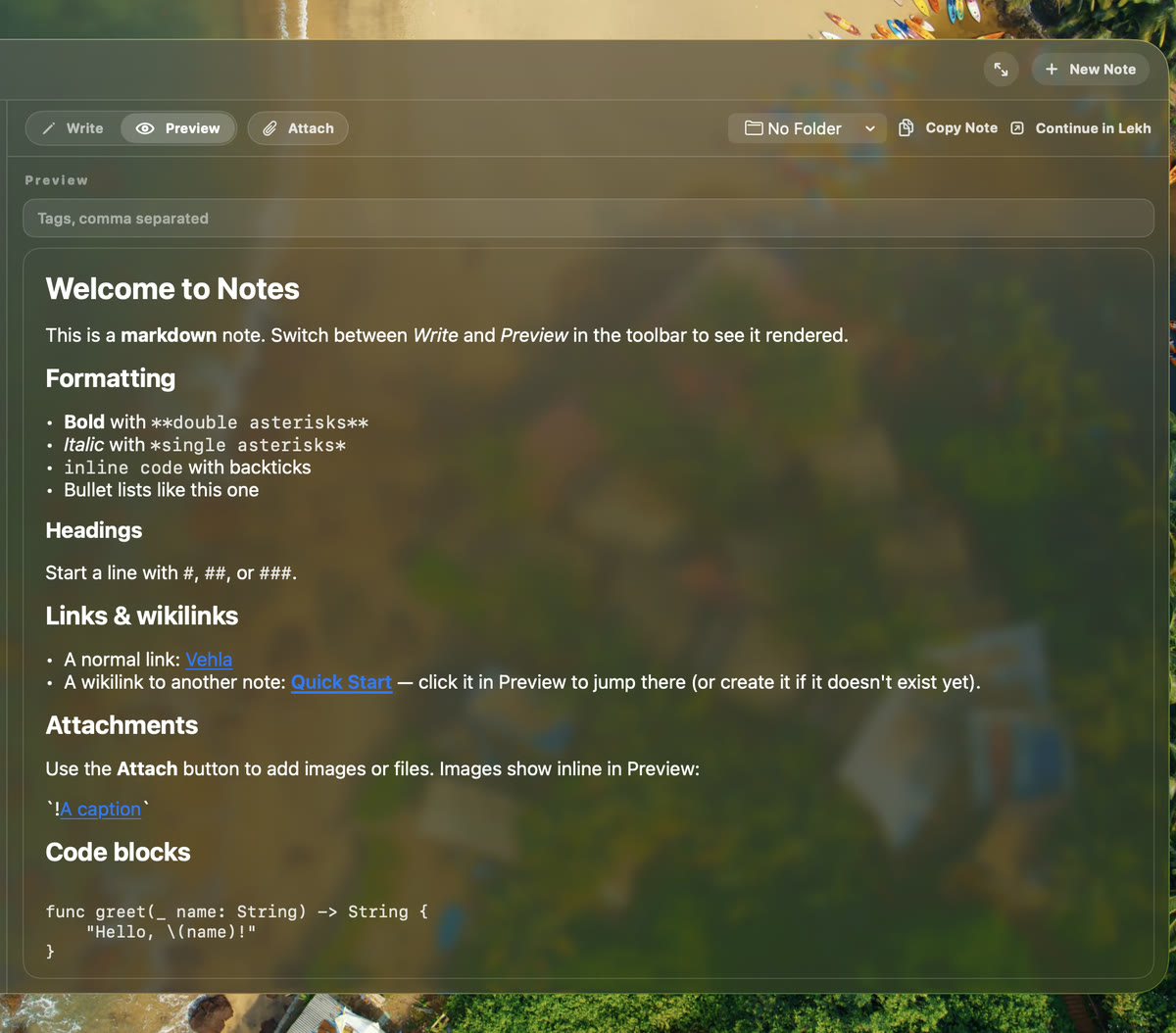
Notes
Write without opening another app.
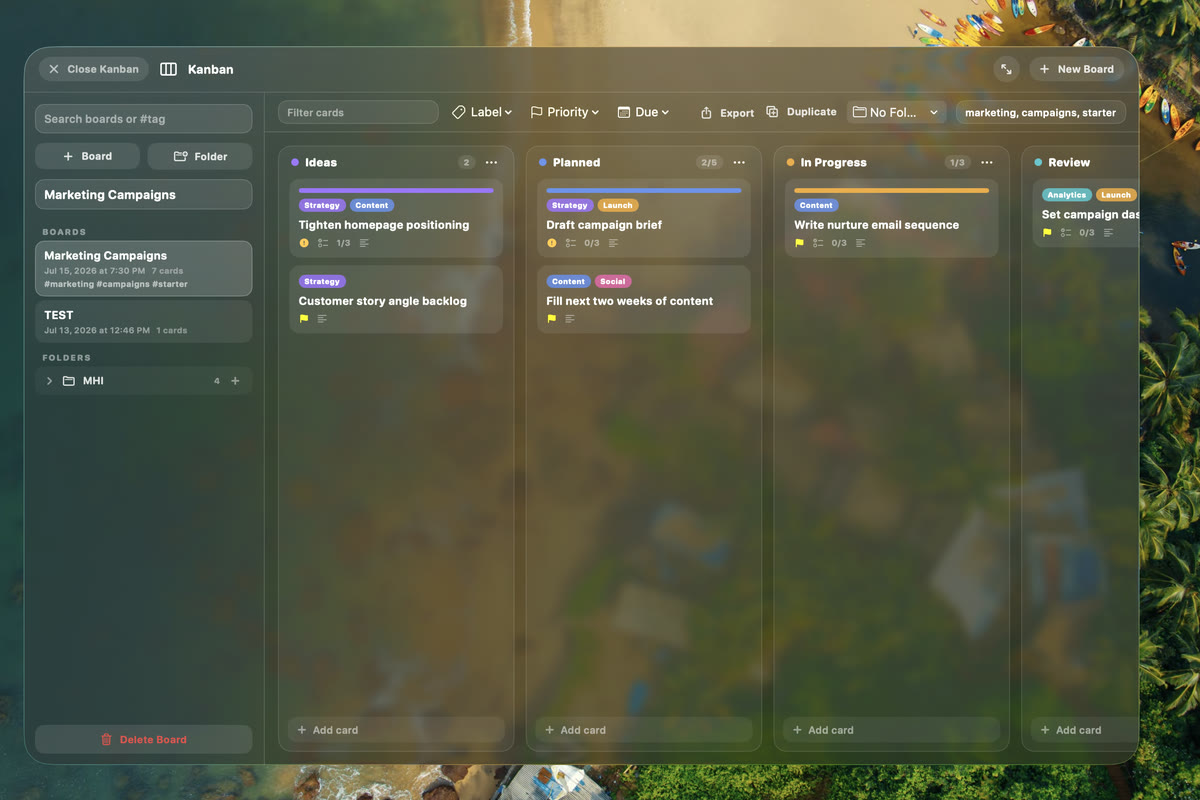
Kanban
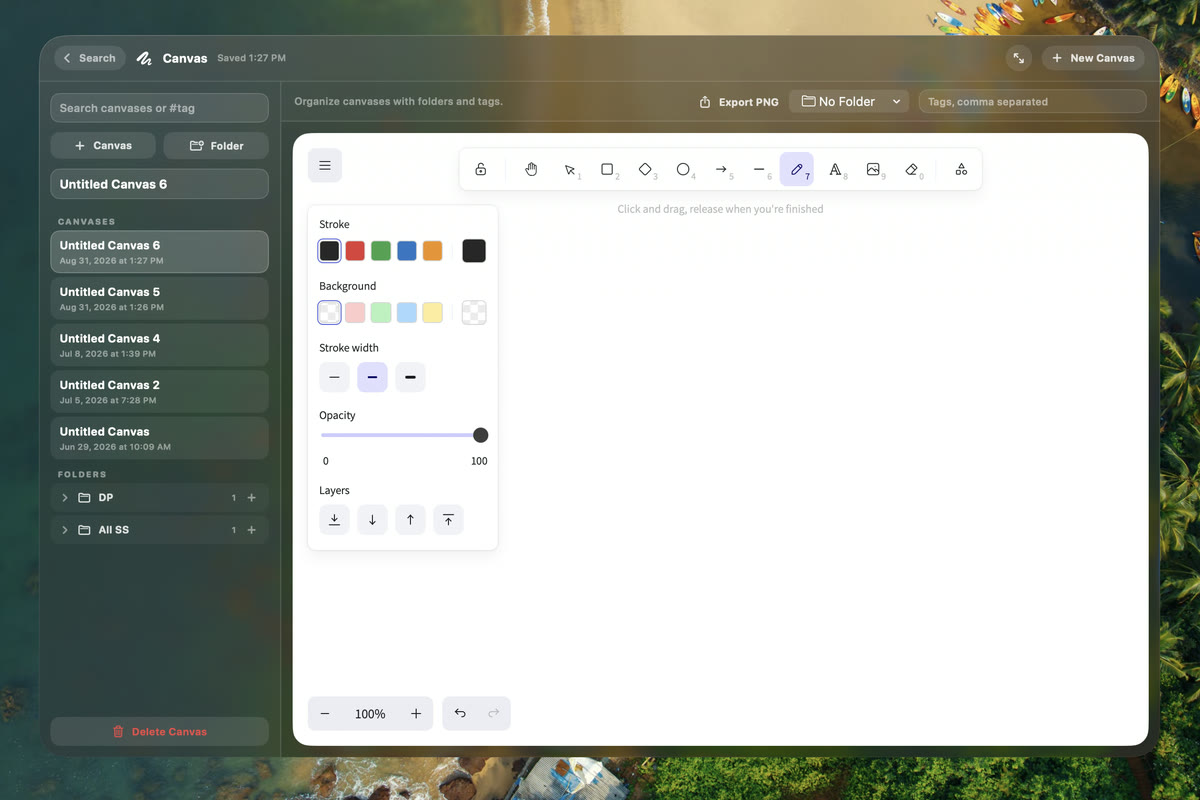
Canvas
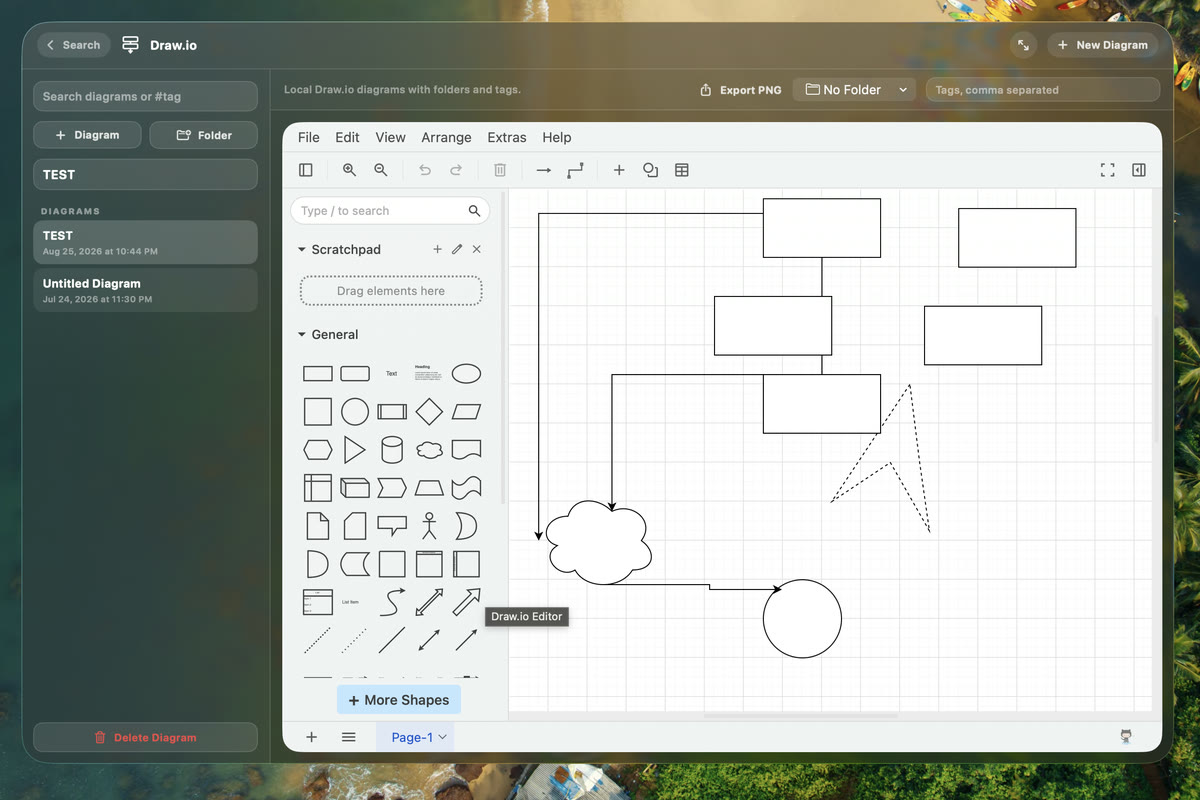
Draw.io
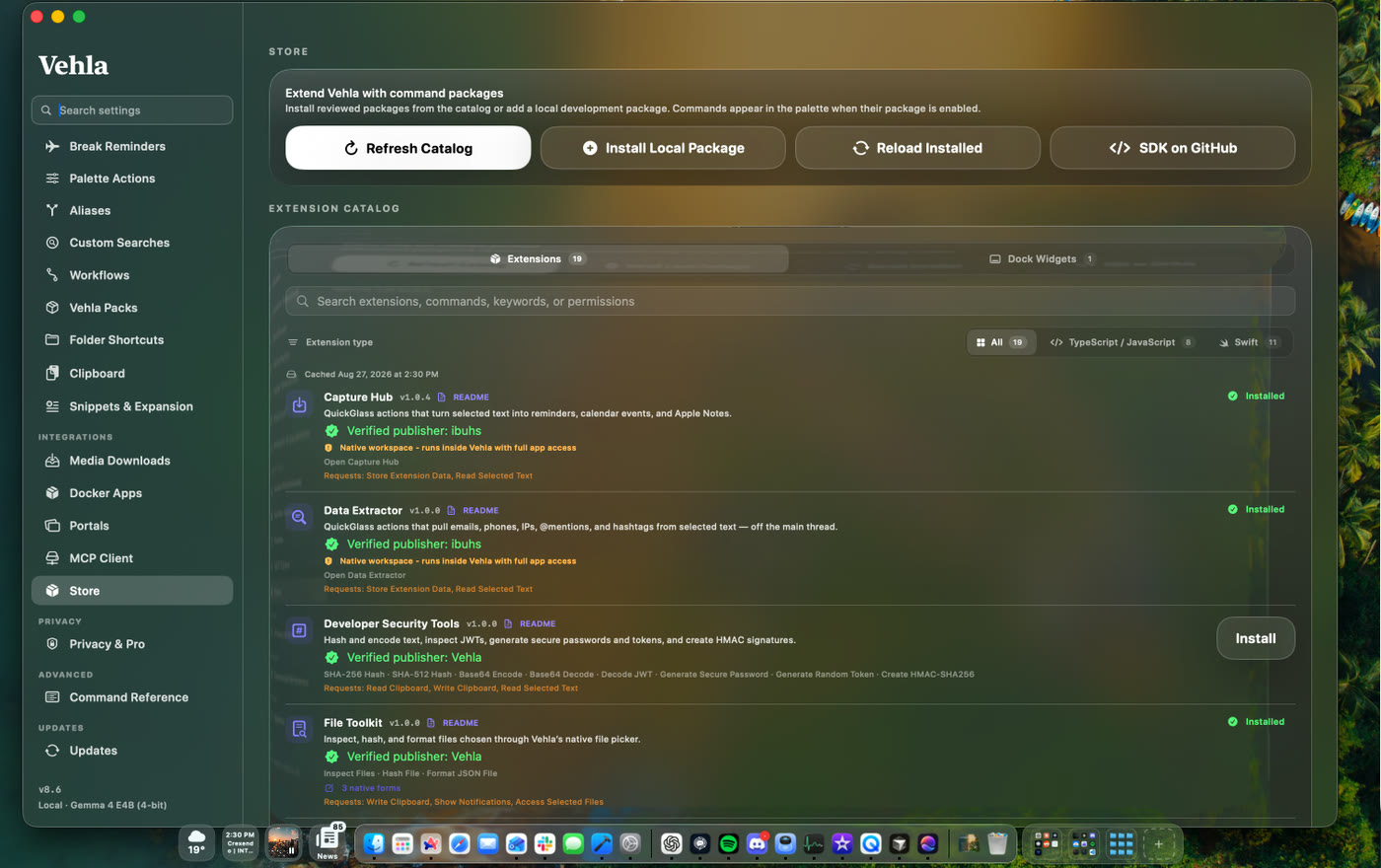
11 / EXTENSIONS & INTEGRATIONS
Vehla isn't supposed to know everything.
Extend it.
NATIVE SWIFT EXTENSIONS DOCK WIDGETS MCP SERVERS CUSTOM AI ACTIONS BROWSER INTEGRATION FINDER ACTIONS LEKH AI PRO AWESOMECOPY
Build new actions into the same interface instead of installing another disconnected utility.
12 / PRIVACY
Your Mac.
Your context.
Vehla is local-first. Local models run on your Mac. When you choose a cloud provider, your Mac talks directly to that provider using your own API key. Vehla is designed around keeping the operating-system layer under your control.
MAC↓VEHLA↓LOCAL MODEL
MAC↓VEHLA↓YOUR PROVIDER
13 / EVERYTHING CONNECTED
The point isn't more features.
It's fewer disconnected tools.
14 / FEATURE LANDSCAPE
One app, or a stack of focused utilities?
Vehla overlaps with launchers, window managers, notch tools, shelves, clipboard apps, selection tools, dictation apps, text expanders, uninstallers, OCR tools, media downloaders, Homebrew GUIs, notes apps, and menu-bar cleaners. This matrix shows where each product is broad, focused, or extensible.
✓BUILT IN ◐PARTIAL, ADD-ON, OR EXTENSION -NOT A CORE FEATURE
| PRODUCT | PALETTE | AI | CLIPBOARD | WINDOWS | NOTCH / SHELF | MENU BAR | NOTES / CANVAS | PRICE |
|---|---|---|---|---|---|---|---|---|
|
Vehla NATIVE COMMAND CENTER |
✓ | ✓ MLX · BYOK · OLLAMA · LEKH |
✓ | ✓ SNAP WHEEL |
✓ ISLAND + SHELF |
✓ BARKEEP |
✓ NOTES · CANVAS · KANBAN |
Free forever PRO $29.99 ONCE · 2 MACS |
|
Raycast LAUNCHER PLATFORM |
✓ | ✓ HOSTED · BYOK · OLLAMA |
✓ | ✓ | - | - | ◐ NOTES |
Free core PRO $10/MO · $8/MO ANNUAL |
|
Alfred LAUNCHER + WORKFLOWS |
✓ | ◐ WORKFLOWS |
✓ POWERPACK |
◐ WORKFLOWS |
- | - | - |
Free core POWERPACK £34 ONCE |
|
SuperCmd OPEN-SOURCE LAUNCHER |
✓ | ✓ BYOK + OLLAMA |
✓ | ✓ | - | - | ✓ NOTES + CANVAS |
Free MIT OPEN SOURCE |
THE STACK VEHLA OVERLAPS WITH
Fourteen surfaces. Usually fourteen separate purchases.
WINDOW MANAGEMENT
Magnet · Rectangle
FILE SHELF
Dropover · Yoink
MENU-BAR CLEANUP
Bartender · Hidden Bar
DICTATION
MacWhisper · Aiko
TEXT EXPANSION
TextExpander · Rocket Typist
SCREEN OCR
TextSniper · Shottr
COLOR PICKING
ColorSlurp · Digital Color Meter
NOTES, BOARDS, CANVAS
Obsidian · Bear · Trello
How to read this: fewer checks do not mean a worse app. Magnet, Dropover, Maccy, Hidden Bar, and Amphetamine are intentionally focused. Partial marks indicate an extension, workflow, add-on, or narrower implementation.
15 / FIELD NOTES
The claims,
with receipts.
Comparisons, setup guides, and honest notes from building Vehla. We publish what we checked, when we checked it, and where another tool may be the better choice.
FEATURED COMPARISON · 11 MIN
Vehla vs Raycast vs SuperCmd
Three launchers, three business models, and three different answers to the AI question. The full feature matrix, three-year cost, and cases where we would not choose Vehla.
Read the comparison →
16 / FROM USERS
Used every day.
Built from feedback.
“I absolutely love this app; it is so incredibly useful! This is one of those must have apps that everyone should download. I use it every single day for browsing the web, drafting emails and managing my schedule. I have plenty of favorite features like Snipe Text, dropping files/folders into the Shelf, Flow Dictation, QuickGlass, and SnapWheel. I like to use SnapWheel with Ask AI, to summarize webpages quickly, and the Smart Reply feature. I don't have a huge workflow like others but, for my use case, it most certainly makes my life easier. I HIGHLY recommend this app to anyone looking to streamline their daily tasks and productivity workflow. Thank you so much, Shubi, for spending so much time and hard work on making this amazing application.”
“This is a great launcher replacement and adds so much more. I've been using it for a couple weeks now and I really like it. Plus the developer has added a bunch of features that I've requested and been open to my feedback and suggestions! That's been great!”
“I'm all like - I need a safe app, I need a secure environment, smooth app and Vehla delivers exactly that.I noticed Raycast on day one when I got my Mac. But what pushed me away was exactly that - security. When I saw it wasn't fully local, and that they had previously suffered a breach with data leaked, I said no.
Then, a few months later, I randomly came across Vehla on Reddit. The description instantly sold me. Everything I prefer. I'll admit - in the beginning I struggled a bit with how to use the app, and I'm still figuring out plenty of things, so I wouldn't call myself fluent with it yet. But the sheer number of options it packs in is impressive.
My favorite features are Quick Glass (Magic Rewrite, Translate), Dock Widgets, Glide, and Portals. The local AI is often genuinely useful when I need a quick translation, to check a business email, and things like that. It's a small app, but it does a lot. It genuinely helps with my everyday workflow, both private and professional.
My honest recommendation to everyone: if you want a powerful app that does everything Raycast does, but with security as the top priority - plus a very fair price and a developer who is friendly and always ready to help - you've come to the right place.”
17 / PRICING
Start free.
Upgrade once.
Vehla Free stays free forever. When you want every workspace, surface, automation, integration, and larger model, unlock Pro with one lifetime purchase.
FREE FOREVER
Vehla Free
$0 forever
A useful Mac command center without starting a trial or entering a card.
Command Palette, app and file search
Native utilities and basic window management
50-item rolling clipboard history
5 notes and 3 snippets
50 successful AI sessions or actions per month
Local catalog models up to 2B parameters
Bring your own cloud-provider keys
Notes, Color Picker, QR Code, and Network Ports workspaces
LIFETIME LICENSE
Vehla Pro
$29.99 once · 2 Macs
Everything in Free, plus every advanced Vehla feature. Try Premium for 7 days with no card.
All workspaces, surfaces, and integrations
Advanced AI actions, Recall, Flow, and MCP
Larger catalog models and custom MLX imports
Expanded clipboard, notes, snippets, and AI access
Automations, workflows, personas, and memory
Free updates for life · activate on 2 Macs
Deactivate / reactivate any time
Priority support
7-DAY PREMIUM TRIAL · NO CARD REQUIRED · REFUND WITHIN 7 DAYS OF PURCHASE
18 / QUESTIONS
Common questions
What is Vehla?
A native macOS command center that replaces a stack of single-purpose utilities: command palette, on-device AI actions, window management, clipboard intelligence, dictation, file shelf, menu-bar cleanup, and notes, canvas and Kanban workspaces - all behind one hotkey.
How much does Vehla cost?
Vehla Free is free forever with no card. Vehla Pro is a one-time $29.99 for two Macs, with free updates for life. There is no subscription and no renewal, and a 7-day Premium trial that also does not ask for a card.
What are the system requirements?
macOS 15.0 or later on Apple Silicon. Vehla does not run on Intel Macs or earlier macOS versions.
Does Vehla need an internet connection?
Not for the core of it. With a catalog model downloaded and Local AI selected, text AI actions, dictation, clipboard OCR, Recall retrieval and every native command run on-device. Cloud providers, web search, vision actions, licensing and updates need a connection.
Do I need my own API key?
Only if you want cloud models. Vehla ships an on-device MLX runtime, so you can run text actions with no key at all. For cloud, bring a key for OpenAI, Anthropic, Google, DeepSeek or OpenRouter - it is stored in macOS Keychain and requests go straight from your Mac to the provider.
How does Vehla compare to Raycast or Alfred?
Raycast has the largest extension catalog and hosted AI on a subscription; Alfred has the deepest workflow automation. Vehla's differences are the on-device model, the surfaces beyond the palette, and a one-time price. We wrote both comparisons in full, including where the others win.
Your Mac already has enough apps.
Make them one.
FREE TIER · 7-DAY PRO TRIAL · ONE-TIME $29.99